
WhatsApp Hidden Features: These Useful Tricks Can Make Chats More Private, Organised and Convenient
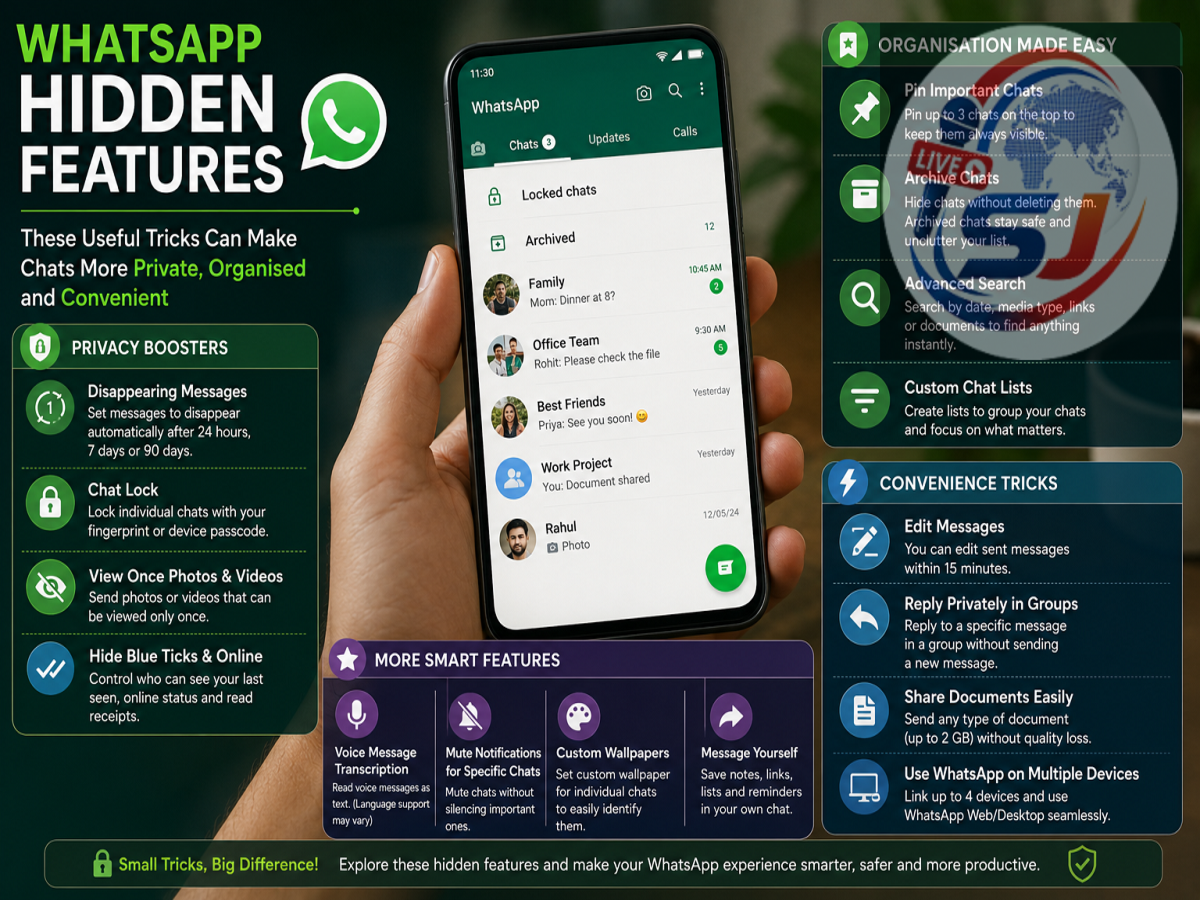
WhatsApp has become one of the most commonly used communication apps for messaging, voice calls, video calls, document sharing and everyday conversations. Despite using the app regularly, many users may not explore all the privacy and chat-management tools available inside it.
Some features can reduce unnecessary contact-saving, while others provide greater control over private conversations, online activity and Status updates. Knowing where these options are located can make everyday WhatsApp use more convenient.
Here are some useful WhatsApp features worth knowing.
Start a WhatsApp Chat Without Saving the Number
There are situations when you need to contact someone only once—for example, a delivery person, shopkeeper or service provider. Saving every such number in your phone's contacts can quickly make the address book cluttered.
WhatsApp allows users to start conversations with numbers without necessarily keeping them permanently saved as contacts. Depending on the app version and device, supported options can be used to find or initiate a conversation with a valid WhatsApp number.
This can be particularly convenient for one-time conversations.
Use Disappearing Messages for Temporary Conversations
WhatsApp's Disappearing Messages feature allows new messages in a conversation to disappear automatically after a selected duration.
Users can enable this option for individual chats where they do not want every new message to remain indefinitely in the chat history.
However, disappearing messages should not be considered a guarantee of secrecy. The recipient may still be able to preserve information in other ways, such as taking screenshots or copying content before it disappears.
Protect Personal Conversations With Chat Lock
Sharing your smartphone with family members or handing it to someone temporarily can create privacy concerns. Chat Lock provides an additional layer of protection for selected WhatsApp conversations.
When supported and enabled, locked chats are separated from the regular chat list and access may require device authentication, such as a fingerprint, Face ID or passcode.
This can be useful for personal, professional or financial conversations that you do not want immediately visible to someone using your phone.
Control Who Can See Your Last Seen and Online Status
Not everyone wants contacts to know when they were last active on WhatsApp.
WhatsApp's privacy controls allow users to manage the visibility of information such as Last Seen and Online status. Depending on the available settings, you can restrict this information rather than automatically making it visible to everyone.
To review these options, open WhatsApp and look under Settings > Privacy. Menu names can differ slightly depending on your device and app version.
Choose Who Can View Your WhatsApp Status
WhatsApp Status is convenient for sharing photos, videos and updates, but you may not want every contact to see everything you post.
Status privacy controls allow you to select the audience for your updates. For example, you may be able to share a Status with your contacts while excluding particular people, or limit an update to selected contacts.
It is worth reviewing these settings before posting personal photos, travel information or family updates.
Edit a Message After Sending It
A typo becomes much more noticeable immediately after pressing Send.
WhatsApp provides an Edit option for eligible sent messages for a limited period after they are sent. Instead of deleting a message and typing it again, you can correct a spelling mistake or other error using the editing option where available.
The edited message is marked as edited, so the recipient can see that a change was made.
Use These Features to Improve Your WhatsApp Privacy
WhatsApp's useful tools go beyond sending texts and making calls. Features such as Chat Lock, disappearing messages, Status audience controls and Last Seen settings can give users more control over their conversations and personal information.
It is also worth periodically opening the Privacy section after updating WhatsApp, as features and menu options can change over time.
For stronger account security, users should also avoid sharing verification codes or OTPs, review linked devices regularly and enable additional account-security options available in WhatsApp.
Note: The exact availability and location of WhatsApp features may vary depending on the Android or iPhone version, region and WhatsApp app version.