
WhatsApp Focus Schedules 2026: Automatically Mute or Hide Chats at Selected Times, Check New Feature
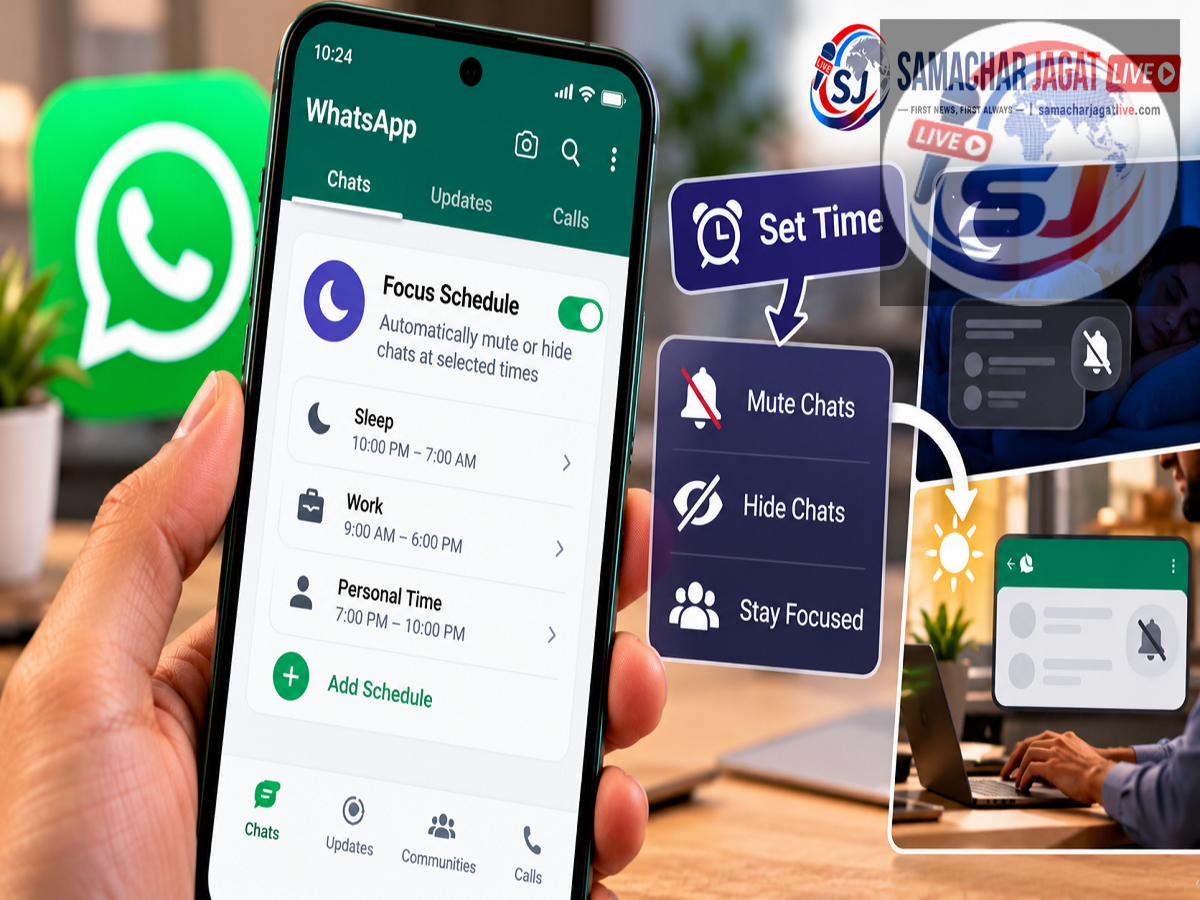
WhatsApp New Feature 2026: WhatsApp is introducing a new feature called Focus Schedules that could make managing notifications much easier for people who receive dozens of messages throughout the day. The feature allows users to decide when they want notifications from selected chats and groups, helping them avoid unnecessary distractions during work, study or personal time.
According to a report published on October 15, 2026, WhatsApp has started rolling out Focus Schedules to selected Android beta testers with access to WhatsApp Plus premium features.
The new option allows users to create notification schedules for specific chat lists. Once a schedule is configured, WhatsApp can automatically mute notifications or hide selected conversations outside the chosen hours.
The feature was reportedly spotted in WhatsApp beta for Android version 2.26.41.6, available through the Google Play Store beta programme.
However, Focus Schedules is not yet available to every WhatsApp user. Its availability currently depends on beta access, premium eligibility and the gradual rollout.
Here is how WhatsApp Focus Schedules works, how users can configure it and what makes it different from regular chat muting.
What Is WhatsApp Focus Schedules?
Focus Schedules is a notification management feature designed to help users control when selected WhatsApp conversations can interrupt them.
Instead of manually muting and unmuting individual chats throughout the day, users can create schedules that automatically manage notifications.
For example, someone who uses WhatsApp for office communication may want to receive work-related messages during working hours but avoid notifications from those chats in the evening.
With Focus Schedules, the user could configure a work chat list to remain active between 9 AM and 5 PM on weekdays.
Outside that period, WhatsApp would automatically mute notifications from the selected list.
Depending on the chosen settings, users may also be able to hide those chats from their main chat view outside the scheduled hours.
The purpose is to give users greater control over how and when WhatsApp demands their attention.
WhatsApp Focus Schedules Spotted in Android Beta Update
The feature was previously identified in WhatsApp beta for Android version 2.26.39.9.
At that stage, reports suggested that WhatsApp was developing advanced notification controls as part of its premium offering.
Now, according to WABetaInfo, Focus Schedules has started reaching selected users through WhatsApp beta for Android version 2.26.41.6.
The report indicates that the feature is being introduced gradually rather than becoming available to all accounts simultaneously.
This means that installing the latest beta update may not automatically unlock the option.
Users may need to wait until WhatsApp enables the feature for their accounts.
How to Set Up Focus Schedules on WhatsApp
According to the reported interface, eligible WhatsApp Plus subscribers can create a Focus Schedule through their chat list settings.
The process is expected to work as follows:
-
Open WhatsApp on a supported Android device.
-
Navigate to the settings for the relevant chat list.
-
Look for the New Schedule option.
-
Create a name for the schedule.
-
Select the chats or groups that should be included.
-
Choose the days and times when notifications should remain active.
-
Select the preferred notification or chat visibility behaviour.
-
Save the schedule.
Once configured, WhatsApp will manage notifications according to the selected timing rules.
The exact menu names and steps may change before a wider public release.
What Happens During Scheduled Hours?
During the time periods selected by the user, notifications from the relevant chat list will operate normally.
For example, if a user creates a schedule allowing work notifications from 9 AM to 5 PM, WhatsApp will display notifications from those conversations during that period.
Users can continue sending and receiving messages as usual.
The schedule is intended to control interruptions rather than prevent people from communicating.
This distinction is important because Focus Schedules is not described as a tool that blocks other users from sending messages.
Instead, it changes how selected conversations appear and notify the account holder.
What Happens Outside the Scheduled Time?
When the selected time period ends, WhatsApp can automatically apply the notification restrictions configured by the user.
The report describes two main options: muting conversations and hiding them.
With the mute option, notifications from the selected chat list become silent, while the conversations remain visible.
With the hide option, the selected conversations can be removed from the usual chat view during the restricted period.
These controls are optional, allowing users to choose the arrangement that best suits their preferences.
For example, someone may prefer to keep work conversations visible but silent after office hours.
Another person may want those chats hidden from the main view to reduce distractions.
The feature therefore offers more flexibility than a simple permanent mute setting.
Can You Create Multiple Notification Time Slots?
Yes. According to the supplied report, users can configure multiple time periods within a schedule.
This could be useful for people who do not follow a single continuous daily routine.
For example, someone might want notifications from a particular chat list during the morning and again in the afternoon.
They could configure separate active periods rather than leaving notifications enabled throughout the day.
This may be especially helpful for students, shift workers and people managing different responsibilities.
The ability to select days and times also allows users to create schedules that reflect weekday and weekend routines.
Example: Automatically Mute Work Chats After Office Hours
Consider an employee who regularly receives WhatsApp messages from colleagues and office groups.
The employee wants to remain available during working hours but reduce interruptions after leaving the office.
A Focus Schedule could be configured with the following settings:
| Setting | Example |
|---|---|
| Schedule Name | Work |
| Selected Chats | Office groups and colleagues |
| Active Days | Monday to Friday |
| Notification Hours | 9:00 AM to 5:00 PM |
| Outside Scheduled Hours | Automatically mute notifications |
| Optional Setting | Hide selected chats |
With this arrangement, notifications would remain active during the selected working hours.
After 5 PM, WhatsApp would apply the chosen restrictions automatically.
The example is illustrative and does not represent a mandatory schedule or default configuration.
Can Different Chat Lists Have Different Schedules?
One of the more useful aspects of Focus Schedules is the ability to create separate rules for different chat lists.
For example, a user could have one list for office communication and another for study-related conversations.
Each list could follow a different notification schedule.
A work list might remain active during weekday office hours.
A study list might be configured for afternoon classes or evening revision sessions.
This allows users to organise notifications according to the purpose of each conversation.
Instead of repeatedly changing notification settings, they can establish rules that operate automatically.
The report also indicates that users will be able to manage their schedules through chat list settings, where the names and active periods are displayed.
Focus Schedules vs Regular WhatsApp Mute Feature
WhatsApp already allows users to mute individual conversations and groups.
However, Focus Schedules introduces time-based automation.
| Feature | Regular Chat Mute | Focus Schedules |
|---|---|---|
| Mute Notifications | Yes | Yes |
| Automatic Time-Based Rules | Not the standard mute function | Yes |
| Manage Selected Chat Lists | Limited | Supported in reported feature |
| Set Different Active Hours | No dedicated schedule | Yes |
| Multiple Time Periods | No dedicated schedule | Reportedly supported |
| Automatically Hide Chats | Not part of basic mute | Optional reported feature |
| Availability | Widely available | Selected premium beta users |
The main advantage of Focus Schedules is that users can configure notification rules once and let WhatsApp apply them automatically.
Is WhatsApp Focus Schedules a Free Feature?
According to the supplied report, Focus Schedules is being introduced as part of WhatsApp Plus, a premium feature offering.
The report indicates that selected subscribers with beta access are receiving the functionality first.
Therefore, users should not assume that the feature is available to all free WhatsApp accounts.
The final subscription requirements, pricing and broader availability should be confirmed through official WhatsApp announcements.
Users should also be cautious of unofficial applications or websites claiming to unlock premium features without authorisation.
What Other Features Are Reportedly Included in WhatsApp Plus?
The supplied report mentions several additional customisation benefits associated with WhatsApp Plus.
These reportedly include more control over application themes, customised emoji reactions and the ability to pin more than three chats.
Focus Schedules would add another category of customisation by allowing users to control notification timing.
Together, these features suggest an emphasis on personalisation and advanced chat management.
However, the final set of premium benefits may vary as WhatsApp continues testing and developing its offering.
Who Will Benefit Most From Focus Schedules?
Focus Schedules could be useful for people who manage several types of conversations on WhatsApp.
Office employees may use it to separate professional communication from personal time.
Students could configure schedules for study groups and class discussions.
Business owners may use different schedules for work-related chat lists.
People who receive frequent group messages may also appreciate the ability to reduce interruptions during certain hours.
The feature could be particularly convenient for users who currently mute and unmute the same conversations every day.
How to Check Whether Focus Schedules Is Available
Users interested in the feature can check whether their WhatsApp account has received the option.
Eligible Android beta testers should ensure that they are using a supported version of WhatsApp.
They can then inspect the settings associated with their chat lists.
If a Focus Schedules or New Schedule option appears, they may be able to configure it.
However, the absence of the option does not necessarily indicate a problem with the device.
The feature is reportedly being released gradually, and not every beta account will receive access at the same time.
Users should wait for official availability rather than installing modified versions of WhatsApp.
Frequently Asked Questions
What is WhatsApp Focus Schedules?
It is a feature that allows users to schedule when notifications from selected chat lists should remain active or become muted.
Is Focus Schedules available to everyone?
No. According to the October 2026 report, it is initially reaching selected Android beta testers with WhatsApp Plus access.
Which WhatsApp beta version includes the feature?
The rollout was reportedly observed in WhatsApp beta for Android version 2.26.41.6.
Can Focus Schedules hide WhatsApp chats?
The report indicates that eligible users can optionally hide selected conversations outside their configured notification hours.
Can users create different schedules for different chat lists?
Yes. The reported feature supports separate schedules for different lists.
Does Focus Schedules stop people from sending messages?
No. It is designed to manage notifications and chat visibility, not prevent other people from sending messages.
When will Focus Schedules be available to all users?
A confirmed public release date has not been provided in the supplied report.
Final Thoughts
WhatsApp Focus Schedules could become a useful addition for people who want more control over their messaging experience.
By allowing users to set specific notification hours, automatically mute selected chats and optionally hide conversations, the feature aims to reduce distractions without requiring constant manual changes.
Its support for different chat lists and multiple time periods may make it particularly helpful for managing work, study and personal communication.
For now, the feature is reportedly limited to selected WhatsApp Plus beta users on Android, and a wider release has not been confirmed.
Users who do not see the option should wait for further updates and official announcements.
Disclaimer: This article is based on the supplied October 15, 2026 report describing findings attributed to WABetaInfo. The premium feature's rollout, subscription requirements and final functionality have not been independently verified against official WhatsApp documentation and may change during testing.