
SIM Lock on Android: How It Works, What It Protects and Why You May Want to Enable It
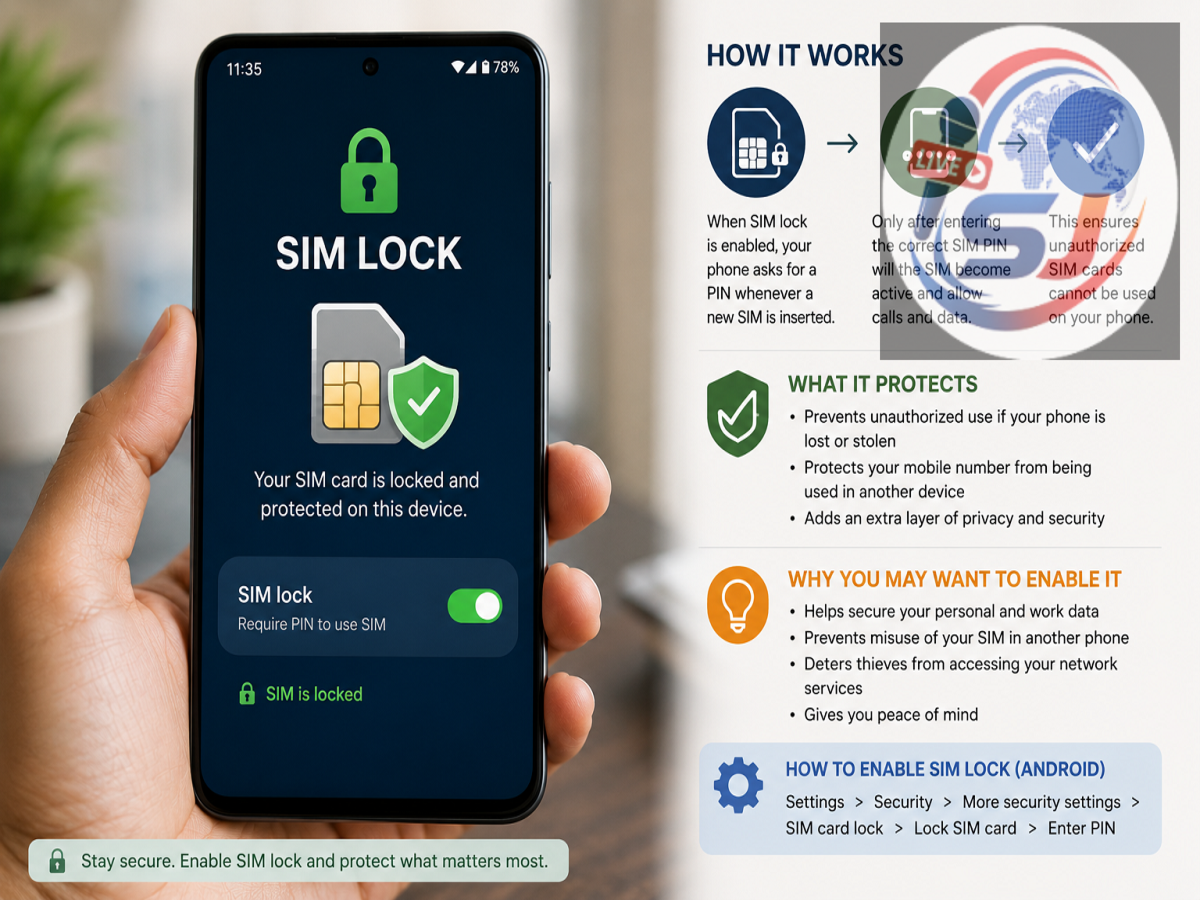
Losing an Android smartphone can create problems far beyond the cost of replacing the device. Your mobile number may be connected to calls, SMS messages, banking alerts, account verification and password-recovery systems. Even if a thief cannot unlock your smartphone, a removable physical SIM could potentially be taken out and inserted into another handset.
This is where SIM Lock, also known as SIM PIN protection, can provide an additional layer of security.
SIM Lock is different from your phone's regular PIN, password, fingerprint or face unlock. It protects the SIM card rather than the data stored on your smartphone. While it cannot secure photos, apps or files, it can make unauthorised use of your physical SIM more difficult.
What Is SIM Lock on Android?
SIM Lock is a security feature that requires a PIN to unlock the SIM card.
Once enabled, the SIM cannot normally connect to the mobile network after certain events—such as restarting the phone or inserting the SIM into another handset—until the correct SIM PIN is entered.
This creates two separate security barriers on your smartphone.
Your screen lock controls access to the device itself, while the SIM PIN controls access to the cellular connection associated with that SIM.
Therefore, knowing the phone's screen PIN does not automatically mean knowing the SIM PIN, and vice versa.
How Does SIM Lock Work?
Suppose someone steals a smartphone protected with a strong screen password.
The thief may not be able to unlock the device. However, if the phone contains an unprotected physical SIM, they could try removing that SIM and inserting it into another compatible phone.
With SIM Lock enabled, moving the SIM does not automatically give them access to the mobile connection. The new phone should request the SIM PIN before the SIM can be used normally.
This provides an additional obstacle between someone possessing your physical SIM and using your mobile number.
Where Can You Find SIM Lock on Android?
The exact location of the setting depends on the smartphone manufacturer and Android version.
On some Android devices, it may appear under settings related to:
Settings → Security & Privacy → More Security Settings → SIM Lock
Other manufacturers may use names such as SIM Card Lock, Lock SIM, or SIM PIN.
Because Android interfaces vary between Samsung, Motorola, OnePlus, Xiaomi and other manufacturers, the exact steps can differ.
If you cannot find the option, searching for "SIM lock" or "SIM PIN" inside the Settings app is usually the easiest approach.
What Does SIM Lock Actually Protect?
The primary purpose of SIM Lock is to prevent easy unauthorised use of a physical SIM card.
This matters because your mobile number may be connected with several important services.
For example, an attacker who gains control of a phone number may attempt to receive verification messages or exploit account-recovery systems.
SIM PIN protection does not eliminate these threats entirely, but it makes simply removing an unlocked physical SIM and using it in another device more difficult.
Can SIM Lock Protect Your Photos and Personal Files?
No. This is an important limitation.
SIM Lock does not encrypt or protect the information stored inside your Android smartphone.
It does not directly protect your:
-
Photos and videos
-
WhatsApp or other messaging conversations
-
Banking applications
-
Email accounts
-
Saved documents
-
Social-media apps
-
Browser history or saved passwords
Protection for this information comes primarily from Android's device security features and the security measures offered by individual applications and services.
A strong screen PIN or password, biometric authentication where appropriate and updated device software remain essential.
Screen Lock and SIM Lock Are Different
It is useful to think of smartphone security as several separate layers.
A screen lock prevents someone from opening and navigating through your phone.
A SIM Lock prevents straightforward use of the protected physical SIM without its PIN.
Your individual apps and online accounts then provide additional security through passwords, passkeys, two-factor authentication or other verification methods.
Using these security features together provides stronger protection than relying on only one of them.
Why SIM Lock Can Be Useful If Your Phone Is Stolen
Imagine your phone disappears while travelling.
A strong screen password may stop someone from opening your apps. But if the physical SIM itself is not protected, removing it from the locked phone becomes another possible avenue of attack.
SIM Lock adds a barrier because the SIM PIN should be required when that SIM is placed in another handset.
This does not make SIM-related fraud impossible. Criminals may use other techniques, including phishing, social engineering or fraudulent SIM replacement attempts.
Nevertheless, SIM Lock closes one relatively straightforward physical route to using the original SIM.
Be Very Careful When Setting the SIM PIN
The biggest practical warning about SIM Lock concerns incorrect PIN attempts.
Do not guess your SIM PIN repeatedly.
Your SIM PIN is not necessarily the same as your phone's screen-lock PIN. If you have never changed the SIM PIN, the card may have an operator-provided default PIN.
Check your mobile operator's documentation or contact customer support if you are unsure.
Repeatedly entering an incorrect SIM PIN can cause the SIM to become blocked.
What Happens If the SIM Gets Blocked?
If too many incorrect SIM PIN attempts are made, you may need a PUK (Personal Unblocking Key) to restore access.
The PUK is generally provided or recoverable through your mobile network operator.
You should never try random PUK combinations. Too many incorrect PUK attempts can create more serious problems and may result in the SIM becoming permanently unusable, requiring replacement.
Therefore, make sure you know the correct SIM PIN before enabling, disabling or changing this security feature.
Should You Change the Default SIM PIN?
If your operator provides a default SIM PIN, changing it to a PIN known only to you can improve the usefulness of SIM Lock.
Avoid easily guessed combinations such as repeated digits or other obvious numbers.
At the same time, choose something you can reliably remember or store securely. A security feature becomes inconvenient if you accidentally lock yourself out of your own mobile connection.
What About eSIM?
The physical-removal scenario is mainly relevant to traditional removable SIM cards.
An eSIM is built into the device and cannot simply be pulled out and inserted into another smartphone. However, eSIM users should still protect their devices and telecom accounts because other forms of account takeover or fraudulent SIM replacement can remain possible.
Whether SIM PIN functionality is available and how it behaves with eSIM can also depend on the handset and mobile operator.
Is SIM Lock Worth Using on Android?
For many people who still use a physical SIM, SIM Lock can be a worthwhile additional security feature.
It does not replace a screen password, fingerprint authentication, device encryption or account-level security. Instead, it addresses a specific vulnerability: someone physically removing your SIM and trying to use it in another device.
A good smartphone security setup therefore combines a strong screen lock, SIM protection where appropriate, updated software, secure account authentication and theft-protection features.
The key takeaway is simple: SIM Lock does not protect all the data on your Android phone, but it can help protect access to the physical SIM and the mobile number associated with it. As one part of a layered security setup, that small additional barrier can be valuable if your smartphone is ever lost or stolen.