
Jio Call History: How to Check Your Call Details Using OTP in MyJio App
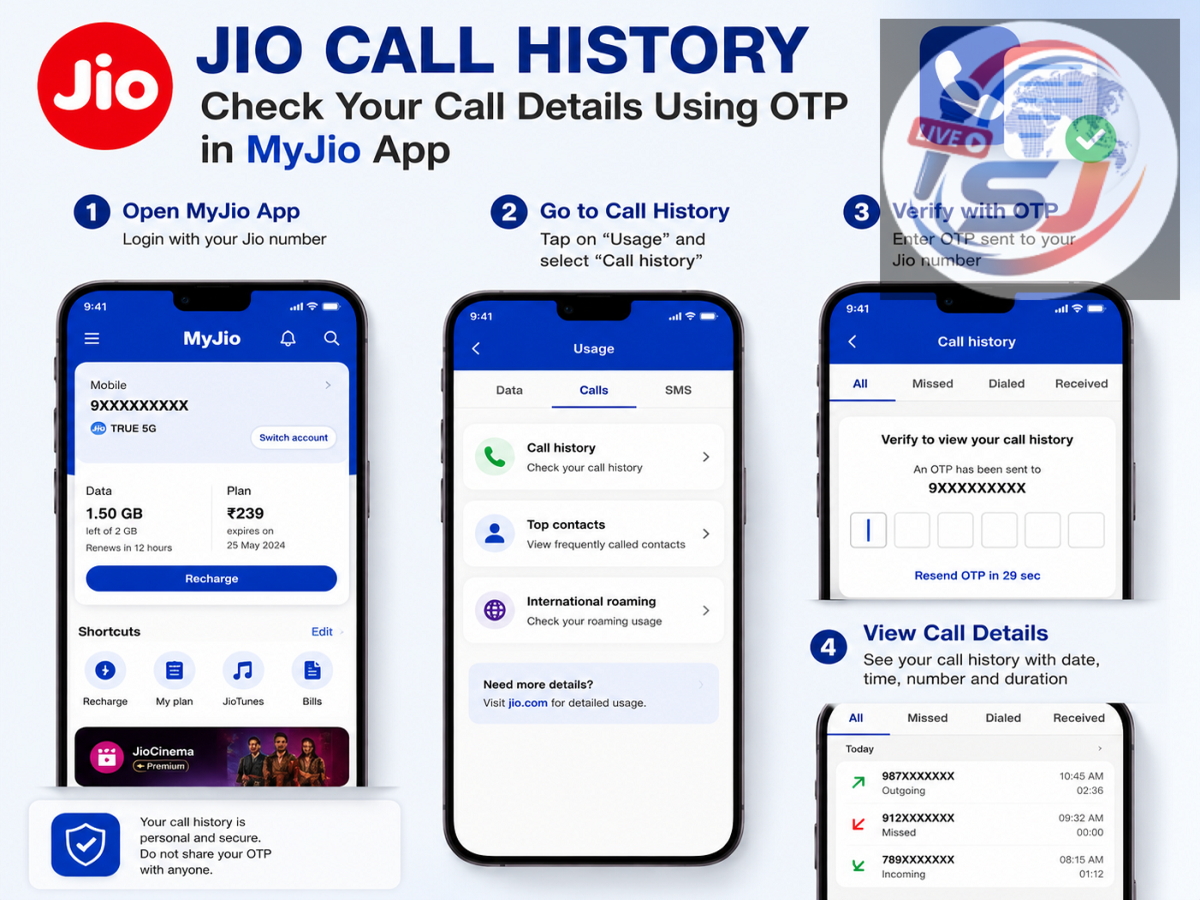
Jio Call History Check: Deleted an old number from your phone's call log or want to check calls made from your Jio number on a particular date? Jio users can access available usage information through the MyJio app after verifying their own mobile number with an OTP.
The feature can be useful when older entries are no longer visible in the smartphone's call log. Users can check their own account information without relying on unknown third-party applications or websites.
However, there is an important point to understand: an OTP does not magically reveal anyone's call history. It is used to authenticate access to the Jio account linked to that mobile number. You should use this method only for your own number or an account you are authorised to access.
How to Check Jio Call History Through MyJio
The process can be completed through the MyJio app. Start by opening the application and signing in with your Jio mobile number.
Jio will send a one-time password to the registered number for verification. Enter the OTP to access your account.
Once logged in, select the relevant mobile connection and look for the Check Usage section. The available usage information can include details related to calls made from your number.
The exact names or placement of options may change as the MyJio app receives updates, so users should look for sections related to usage, statements or account activity if the interface appears different.
Need Older Call Details? Check the Statement Option
If you need information for a particular period rather than only recent usage, MyJio's statement facility can be useful.
Users can select an available date range and generate a usage statement for their connection.
According to the information provided for the service, users can access statements for eligible periods within the previous six months, with a maximum period of up to 30 days selected for an individual statement.
This can be particularly helpful when the required call information is no longer available in the phone's local call history.
Can You Download the Jio Usage Statement?
The statement feature can also make it easier to retain a copy of the available account information.
Depending on the options available in MyJio, users may be able to download the statement as a PDF or have it delivered to their registered email address.
Keeping a statement can be useful when you need to refer to usage information later instead of repeatedly searching through the application.
However, because such documents may contain personal communication information, they should be stored securely and should not be shared unnecessarily.
Why MyJio Can Be Better Than Your Phone's Call Log
Your smartphone's call history and your telecom account's usage records are not necessarily the same thing.
A phone stores call-log information locally. Older records may eventually disappear, or users may accidentally delete them. Changing or resetting a smartphone can also affect locally stored call information.
The telecom operator's account system, on the other hand, may retain certain usage records for the period made available to customers.
Therefore, MyJio can provide another way to check available information related to calls made using your Jio connection.
Don't Use Unknown Apps to Find Call History
Searching online for "call history checker" can lead users to websites or applications that make exaggerated promises.
Some may claim they can reveal the call records of any mobile number by entering a phone number or OTP. Such services can create serious privacy and security risks.
Avoid installing unknown applications or entering your Jio credentials, Aadhaar details, banking information or OTP on suspicious websites.
For your Jio account information, using Jio's official services is safer than relying on third-party tools that claim to retrieve private telecom records.
OTP Does Not Give Access to Anyone's Call Records
The role of the OTP should also be clearly understood.
When you log in to your Jio account, the OTP is used to verify that you have access to the registered mobile number. It is an authentication mechanism, not a tool for secretly retrieving another person's call history.
Trying to access another person's telecom account or call information without permission can violate their privacy and may have legal consequences.
Users should therefore access only their own account or an account they have legitimate authority to manage.
Never Share Your Jio OTP With Anyone
An OTP is confidential and should be treated like a password.
If someone calls or messages you and asks for an OTP while claiming that they can retrieve your call history, activate a service, fix your SIM or provide a special offer, do not share it.
Anyone who obtains your OTP may potentially gain unauthorised access to services linked to your mobile account.
Also avoid entering an OTP on a webpage opened through an unknown SMS, WhatsApp message, social media advertisement or suspicious link.
Quick Steps to Check Your Jio Usage
To check available call-related usage information, open the MyJio app and sign in using your own Jio number. Verify the login with the OTP received on that number, select your mobile connection and open the usage section.
For information covering a specific eligible period, look for the statement option and choose the required date range. Where available, the statement can then be saved or sent to your registered email.
Most importantly, remember that this facility is intended to help Jio customers access information related to their own mobile connection. Never share your OTP with another person or use unverified websites promising access to private call records.