
Google Lens and Circle to Search Can Help Spot Fake Messages: Here's How to Check for Scams
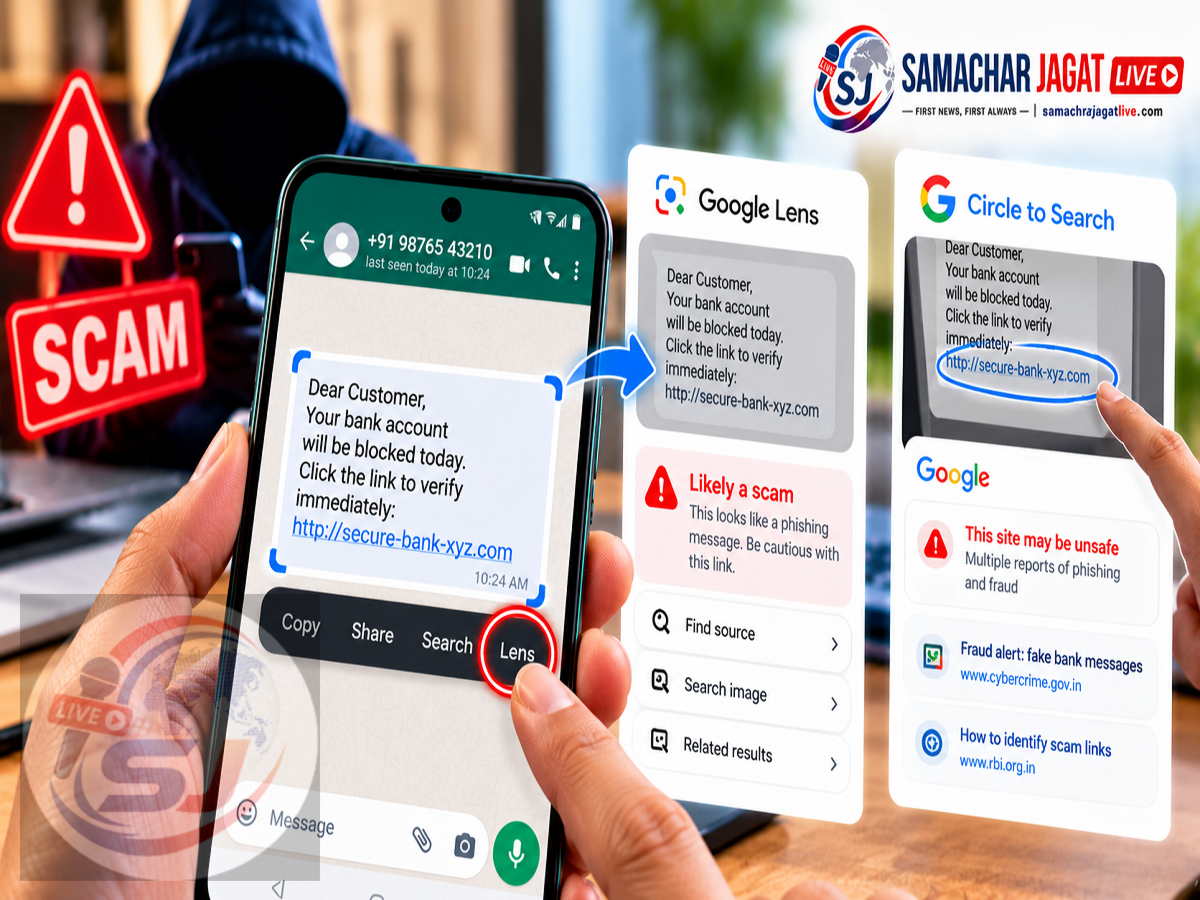
Google Scam Detection Features 2026: Cybercriminals are increasingly using convincing text messages to trick smartphone users into sharing personal information, clicking suspicious links or transferring money. From fake bank alerts to fraudulent delivery notifications, these messages often appear genuine enough to confuse even experienced phone users.
However, two existing Google features—Circle to Search and Google Lens—can help users investigate suspicious messages and identify potential warning signs before taking action.
According to a report published on October 16, 2026, Google's AI-powered search capabilities can analyse the content of suspicious messages and, where supported, provide information about possible scams.
These tools may help users understand why a message looks suspicious, whether its claims resemble known fraud techniques and what precautions they should take.
The biggest advantage is that users can examine messages without immediately opening suspicious links or responding to unknown senders.
Here is how Google Lens and Circle to Search work, how to use them and why they could be useful for protecting your personal and financial information.
Google Features Can Help Identify Suspicious Messages
Online fraud is no longer limited to poorly written emails or obvious spam messages.
Scammers increasingly create convincing messages that appear to come from banks, delivery companies, government departments and even family members.
Some messages claim that a bank account will be suspended unless the recipient completes an urgent verification process.
Others say that a parcel cannot be delivered until a small payment is made.
Fraudsters may also pretend to be relatives or friends facing emergencies and ask for immediate financial assistance.
These tactics rely on fear, urgency and emotional pressure.
Google's Circle to Search and Lens features can help users investigate the content of such messages through search and AI-supported analysis.
However, they should be treated as additional safety tools rather than guaranteed scam detectors.
What Is Circle to Search?
Circle to Search is a Google feature available on supported Android smartphones.
It allows users to search for information displayed on their screens without manually switching to a separate search application.
Users can select text, images or other visible content by circling, highlighting or tapping it.
Google then uses the selected content to provide relevant search results.
When available, AI-powered search features may also help explain the selected information.
For suspicious messages, this can make it easier to investigate unfamiliar claims, unusual links or potential fraud indicators.
For example, a user who receives an unexpected message about a blocked bank account may use Circle to Search to examine the wording without opening the link.
How to Check Fake Messages Using Circle to Search
If your Android smartphone supports Circle to Search, you can use the following process:
-
Open the suspicious SMS, WhatsApp message or other message on your phone.
-
Press and hold the navigation bar or home button, depending on your device.
-
Wait for Circle to Search to appear.
-
Circle or highlight the suspicious message text.
-
Review the Google Search results.
-
If an AI Overview is available, examine any explanation of potential warning signs.
-
Verify the message through an official source before taking further action.
For example, if a message claims that your bank account will be closed within two hours, searching its wording may help identify whether similar messages have been associated with scams.
The feature may also help you investigate suspicious claims about parcel deliveries or urgent payment requests.
However, the appearance of an AI Overview is not guaranteed for every search.
What Warning Signs Can Google's AI Identify?
AI-supported search results may highlight patterns commonly associated with fraudulent messages.
These include urgent requests for money, suspicious website links, demands for confidential information and claims designed to create panic.
Consider a message that says:
"Your bank account will be blocked today. Complete verification immediately using this link."
Several details make this type of message suspicious.
The sender creates urgency, threatens an account restriction and directs the recipient to an external website.
A search of the message may reveal similar scam examples or information about common phishing techniques.
However, AI cannot automatically determine the true identity or intentions of every sender.
Users should independently verify any financial or personal request.
Google Lens Can Help If Circle to Search Is Unavailable
Not every Android smartphone supports Circle to Search.
For users without the feature, Google Lens offers another way to investigate suspicious content.
Google Lens can recognise text within images and help users search for information related to that text.
For example, a user can take a screenshot of a suspicious message and examine it using Lens.
This method can be useful when a message cannot easily be copied or when it contains an image with text.
Google Lens is also available through supported Google applications on iPhones.
This means the screenshot-based approach may help both Android and iOS users.
How to Check a Suspicious Message Using Google Lens
Follow these steps:
-
Take a screenshot of the suspicious message.
-
Open the Google app on your smartphone.
-
Tap the Google Lens icon.
-
Select the screenshot from your gallery.
-
Highlight the relevant message text if necessary.
-
Use the search option to investigate the content.
-
Review the results for possible scam warnings or related information.
Depending on the device, region and available Google features, AI-generated explanations may also appear.
Users should remember that Google Lens does not necessarily classify every message as safe or fraudulent.
It provides a way to examine and search the content, which can support better decision-making.
Circle to Search vs Google Lens: What's the Difference?
Both tools can help users investigate suspicious content, but their methods differ.
| Feature | Circle to Search | Google Lens |
|---|---|---|
| Main Function | Search content directly from the screen | Analyse images and recognise text |
| Device Support | Selected Android smartphones | Supported Android and iPhone devices |
| Screenshot Required | Usually not | Useful for the described method |
| Can Examine Message Text | Yes | Yes |
| Search for Scam Information | Yes | Yes |
| AI Overview Availability | Depends on supported search results | Depends on supported search results |
| Guaranteed Scam Detection | No | No |
Circle to Search may be more convenient because it allows users to investigate content directly from the screen.
Google Lens is a useful alternative when Circle to Search is not supported.
Fake Bank Messages: How These Tools Can Help
Banking-related fraud is one of the most concerning types of mobile scams.
Fraudsters may send messages claiming that an account has been suspended or that KYC information must be updated immediately.
The message may include a link to a website designed to resemble a genuine banking portal.
Before opening such a link, users can search the message text using Circle to Search or Google Lens.
Search results may reveal similar fraud reports or guidance about phishing messages.
However, even if the search does not reveal any warning, users should not assume the message is genuine.
The safest approach is to open the bank's official application or website independently and verify the claim.
Never provide an OTP, UPI PIN, password or card security code through an unsolicited message.
Fake Parcel Delivery Messages
Delivery-related scams often claim that a package is delayed, an address is incomplete or a small fee must be paid.
These messages may contain unfamiliar links that lead to fraudulent websites.
Users can investigate the message wording and sender details before taking action.
For example, searching a suspicious delivery notification may reveal whether similar messages have been reported elsewhere.
If you are expecting a parcel, check its status through the official delivery company's website or application.
Avoid making payments through links received from unknown numbers.
Emergency Messages From Friends or Relatives
Some scammers impersonate people known to the recipient.
A message might claim that a relative is stranded somewhere and urgently needs money.
Such requests can be emotionally convincing, especially when the sender asks the recipient not to call.
Google's search tools may help identify suspicious wording or common scam patterns.
However, the most reliable immediate precaution is to contact the person directly using a phone number you already know.
A voice or video call through an established contact method may help confirm whether the request is genuine.
Do not transfer money solely because a message appears to come from someone familiar.
Can Google Lens Detect Every Scam?
No. Neither Google Lens nor Circle to Search can guarantee accurate detection of every fraudulent message.
AI-generated results may be incomplete, incorrect or unavailable.
Some scam messages may use new wording that has not appeared in public search results.
Others may contain legitimate-looking details that make them difficult to identify.
Similarly, a genuine message could be incorrectly interpreted as suspicious.
Therefore, users should treat search results as supporting information rather than a final verdict.
The safest approach combines technical tools with independent verification and careful judgement.
Important Privacy Precautions Before Scanning Messages
Although Google Lens and Circle to Search can be useful, users should consider the information they are submitting for analysis.
A screenshot may contain phone numbers, account details, personal messages or other sensitive information.
Before uploading or searching a screenshot, crop or remove unnecessary personal details wherever possible.
Avoid sharing passwords, OTPs, financial credentials or confidential documents through search queries.
Users should also review the privacy settings of the Google services they use.
Protecting personal information remains important even when using tools intended to improve online safety.
What Should You Do If You Have Already Clicked a Scam Link?
If you have opened a suspicious link, avoid entering any further information.
Close the page and do not download unfamiliar applications.
If you entered a password, change it through the genuine service and review your account security settings.
If banking information was shared or money was transferred, contact your bank immediately through its official support channels.
In India, victims of suspected cyber financial fraud can report incidents through the national cybercrime helpline 1930 or the official National Cyber Crime Reporting Portal.
Reporting quickly may improve the chances of limiting further financial damage, although recovery is not guaranteed.
Five Safety Rules to Remember
Even with AI-powered tools, basic precautions remain essential.
-
Never share OTPs, UPI PINs or banking passwords with unknown callers or message senders.
-
Avoid opening unexpected links that demand urgent action.
-
Verify payment requests through trusted communication channels.
-
Download applications only from verified publishers and official stores.
-
Use Google Lens or Circle to Search as additional checks, not as proof that a message is safe.
These habits can help reduce the risk of falling victim to phishing and impersonation attempts.
Frequently Asked Questions
Can Google Lens identify fake messages?
Google Lens can help users search the content of suspicious messages and find relevant information. It does not guarantee a definitive scam classification.
What is Circle to Search?
Circle to Search is a Google feature that lets users search for information displayed on their screens by selecting or circling content.
Can Circle to Search detect scam messages?
It can help investigate suspicious wording and potentially surface relevant scam warnings or AI-supported explanations.
Is Circle to Search available on every Android phone?
No. It is available on selected compatible Android devices.
Can iPhone users check suspicious messages using Google Lens?
Yes. Supported Google Lens functionality is available through Google applications on iPhone.
Will Google AI Overview appear for every suspicious message?
No. AI Overviews depend on search availability, language, region and other factors.
What should I do if I receive a fake bank message?
Avoid opening unfamiliar links and verify the claim through your bank's official website, application or customer support.
Final Thoughts
Google Lens and Circle to Search offer smartphone users convenient ways to investigate suspicious messages before responding to them.
Whether a message claims that a bank account is blocked, a parcel is delayed or a relative urgently needs money, these tools can help users search for warning signs and related information.
Circle to Search is particularly convenient on supported Android phones because it allows users to investigate content directly from the screen.
Google Lens provides a practical alternative through screenshot-based searches and can also be used on supported iPhones.
However, neither feature can guarantee that a message is genuine or fraudulent.
Users should always verify unexpected requests independently and avoid sharing sensitive financial information with unknown senders.
Disclaimer: This article is based on the supplied October 16, 2026 report. The availability of Google AI Overviews, Circle to Search and Google Lens features may vary by device, language and region. AI-generated results should not be treated as conclusive evidence of fraud or authenticity.