
Best Place for a WiFi Router at Home: Follow These Tips for Stronger Signal and Better Speed
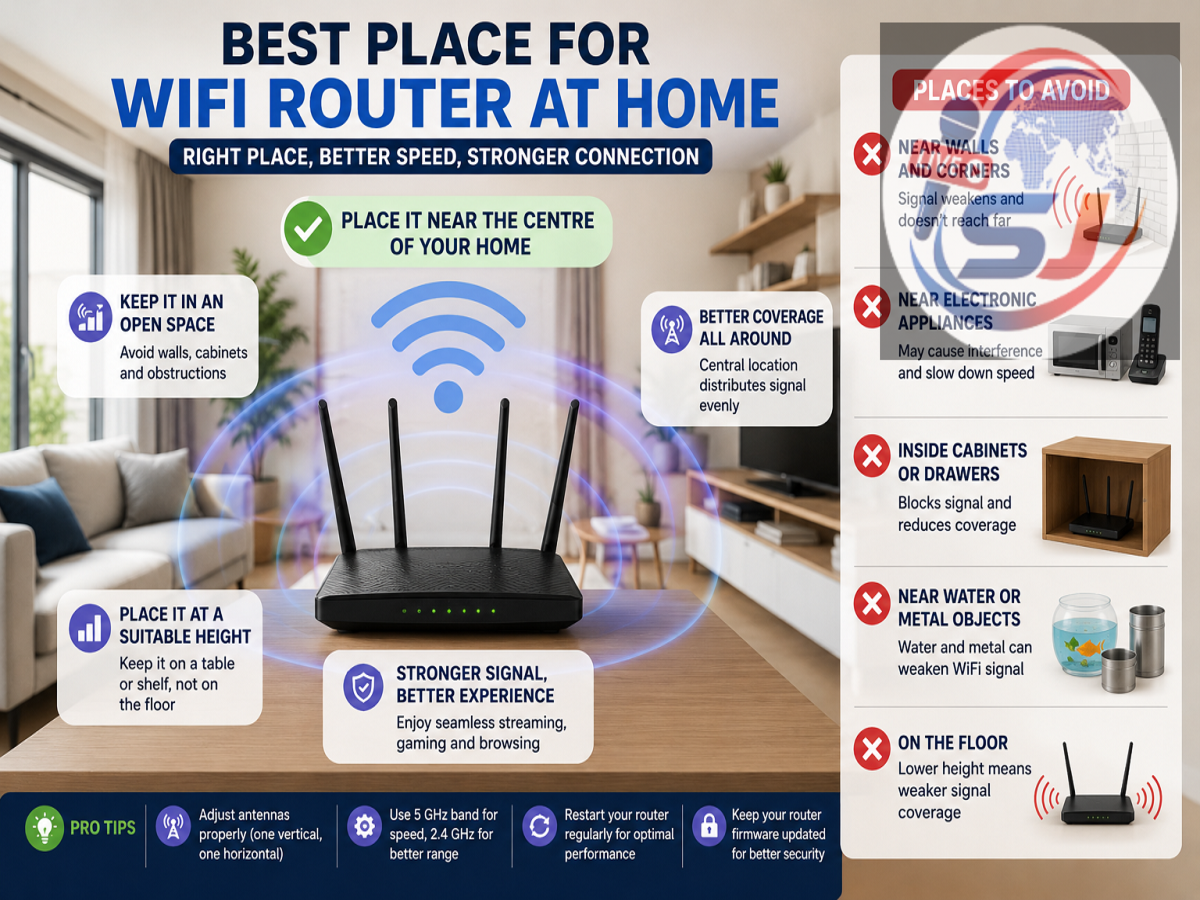
A slow or unstable internet connection is not always caused by your broadband plan. In many homes, poor WiFi performance is linked to the wrong placement of the router. Walls, furniture, electronic appliances and even the height of the device can affect how effectively the wireless signal travels.
Choosing the correct location for a WiFi router can improve coverage, reduce dead zones and provide a more stable connection across different rooms. In most cases, the router should be placed near the centre of the house, in an open and elevated position.
Here is a detailed guide to finding the best location for your WiFi router.
Place the Router Near the Centre of Your Home
A WiFi router sends wireless signals in different directions. Therefore, placing it in a corner room may cause a large part of the signal to travel outside the house instead of reaching other rooms.
Keeping the router in a central location helps distribute the signal more evenly. For example, if your living room is located in the middle of the house, it may be a suitable place for installation.
Avoid placing the router near an outer wall, balcony or entrance unless most connected devices are used in that area.
Keep the Router in an Open Space
WiFi signals become weaker when they are blocked by walls, cupboards and large pieces of furniture. The router should therefore be kept in an open area rather than hidden inside a cabinet, drawer or television unit.
Many people place the router behind a TV or inside a closed wooden shelf to keep wires out of sight. While this may improve the appearance of the room, it can reduce wireless coverage.
Keeping the router visible and free from physical obstructions usually provides better performance.
Install It at a Suitable Height
Do not place the WiFi router directly on the floor. Wireless signals generally travel more effectively when the router is positioned at a reasonable height.
A wall-mounted shelf, table or cabinet placed around waist or shoulder level can be a good option. In a multi-storey house, placing the router on the upper floor or near the staircase may help improve coverage across different levels.
The ideal height may vary depending on the layout of the house, but an elevated and unobstructed position is usually more effective.
Keep It Away From Thick Walls
Concrete walls, metal doors, pillars and large mirrors can interfere with WiFi signals. Kitchens and bathrooms may also create coverage problems because tiles, pipes and appliances can weaken the connection.
If possible, avoid installing the router next to a thick load-bearing wall or behind a metal structure. A location with fewer physical barriers between the router and frequently used devices will offer better speed.
Avoid Keeping It Near Electronic Appliances
Several household appliances can interfere with wireless signals, particularly those operating near the 2.4 GHz frequency band.
Keep the router away from:
-
Microwave ovens
-
Cordless phones
-
Bluetooth speakers
-
Baby monitors
-
Refrigerators
-
Television sets
-
Large electrical equipment
A microwave oven can cause temporary interference while it is running. Similarly, placing the router close to several electronic devices may affect connection stability.
Do Not Place the Router Near Water
Water can absorb or weaken wireless signals. Therefore, the router should not be installed close to a fish tank, water purifier, large indoor fountain or bathroom.
Even a large aquarium placed between the router and connected devices may reduce signal strength. Choose a dry and open location for better performance and device safety.
Adjust the Router Antennas Properly
If your router has external antennas, their position can influence signal coverage.
For a router with two antennas, one can be kept vertical and the other horizontal. This arrangement may help devices receive the signal more effectively because phones, laptops and televisions use antennas in different orientations.
Avoid keeping all adjustable antennas folded or pointing in the same unusual direction. The manufacturer’s instructions may also provide specific guidance for antenna placement.
Use the 5 GHz Band Near the Router
Modern dual-band routers generally provide both 2.4 GHz and 5 GHz networks.
The 2.4 GHz band offers wider coverage and can pass through walls more effectively, but it may be slower and more affected by interference. The 5 GHz band generally provides faster speeds but has a shorter range.
Devices located near the router, such as smart TVs, gaming consoles and work laptops, can benefit from the 5 GHz network. Devices in distant rooms may receive a more reliable connection through the 2.4 GHz band.
Some newer routers automatically select the most suitable band for each device.
Check the Position of the Broadband Connection
Sometimes the router is installed near the main internet cable simply because it is convenient. However, the cable entry point may not be the best place for WiFi coverage.
If the broadband line enters the house near a corner, ask the service provider whether the router can be moved to a more central area using a longer Ethernet or fibre cable.
A small change in placement can significantly improve coverage without requiring a more expensive internet plan.
What to Do in a Large or Multi-Storey House
A single router may not be sufficient for a large home, especially if there are several rooms, floors or thick walls.
In such cases, users can consider:
-
A WiFi range extender
-
A mesh WiFi system
-
An additional access point
-
Ethernet connections for fixed devices
A mesh system uses multiple connected units to provide more consistent coverage across the house. It may be particularly useful in duplexes, villas and large apartments.
However, before buying additional equipment, try repositioning the existing router. In many homes, proper placement alone can solve common connectivity problems.
How to Find WiFi Dead Zones
Walk around the house with a connected smartphone and check where the signal becomes weak or the internet speed drops.
Pay special attention to bedrooms, balconies, study rooms and areas separated by several walls. You can also run speed tests in different rooms to compare performance.
If one particular room continues to receive a weak signal, moving the router slightly or changing its height may help. A range extender or mesh unit can be placed between the main router and the weak-signal area.
Common Router Placement Mistakes
Avoid these common mistakes while installing your WiFi router:
-
Keeping it on the floor
-
Hiding it inside a cabinet
-
Installing it in a corner of the house
-
Placing it behind a television
-
Keeping it close to a microwave oven
-
Positioning it near water or metal objects
-
Covering the router with decorative items
-
Blocking its ventilation openings
Routers generate heat during operation, so proper airflow is also important. Overheating may affect performance and shorten the life of the device.
Final Takeaway
The best place for a WiFi router is generally near the centre of the house, at an elevated position and away from walls, metal objects, water and electronic appliances.
Keeping the router in an open area allows wireless signals to spread more evenly and can improve internet speed in multiple rooms. Users should also adjust the antennas properly, choose the appropriate WiFi band and consider a mesh system for larger homes.
Before upgrading your broadband plan or buying a new router, first check its placement. A simple change in location may provide a stronger, faster and more stable WiFi connection throughout the house.