
Can a Cab Driver Charge Extra for Traffic Jams? Know What App-Based Taxi Passengers Should Do
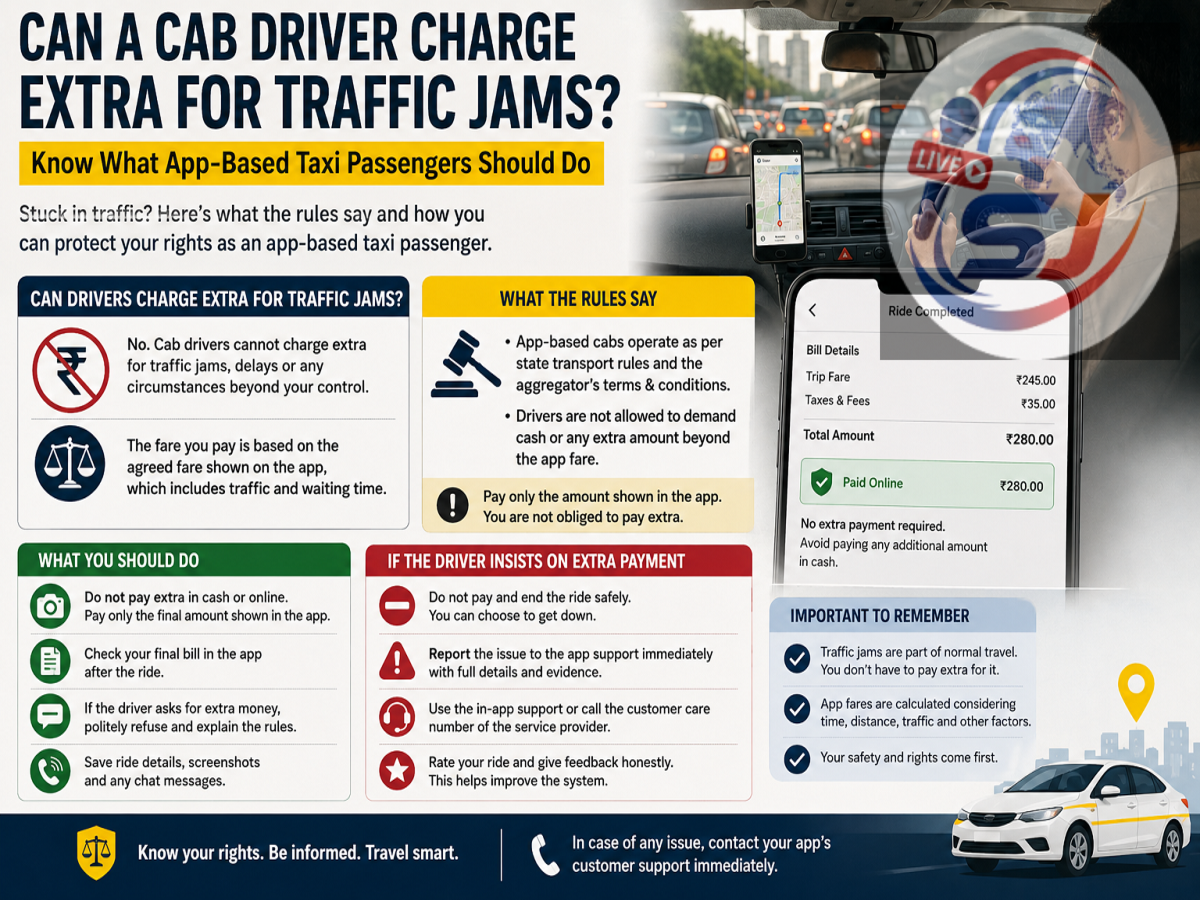
App-based cab services have made daily travel more convenient, allowing passengers to book a vehicle within minutes instead of waiting for a taxi, auto-rickshaw or bus. But fare-related disputes can still occur, particularly when a journey takes longer than expected because of heavy traffic.
A common question among passengers is whether a cab driver can personally demand extra money when the vehicle gets stuck in traffic. In general, for an app-booked ride, passengers should rely on the final fare calculated and displayed by the platform. A driver should not independently add an arbitrary amount simply because the trip took longer due to congestion.
However, the final fare shown by the app itself may change in some circumstances depending on the platform's pricing model, waiting time, route changes, tolls or other applicable charges.
How Is the Fare for an App-Based Cab Calculated?
When you book a cab through a ride-hailing application, the platform calculates the fare according to its pricing system and the applicable rules.
The amount may take into account factors such as distance, estimated journey time, demand at the time of booking and the category of vehicle selected.
Some services show an upfront fare before the passenger confirms the ride. In other cases, the final amount may be affected by circumstances during the journey.
The important distinction is that any legitimate fare adjustment should normally be reflected in the ride details or final bill generated by the app. A driver should not simply decide on a separate amount and demand it outside the platform's billing system.
What Happens When Your Cab Gets Stuck in Traffic?
Suppose you book a cab for a journey expected to take 30 minutes, but congestion extends the trip to an hour.
Depending on the cab platform's fare calculation method, the additional journey or waiting time may influence the final fare. If it does, the revised amount should appear in the app or trip receipt.
Passengers should therefore check the final bill once the journey ends.
If the app displays ₹500 as the payable fare, for example, the driver should not independently demand another ₹100 merely on the ground that the vehicle was stuck in traffic.
Any additional amount should have a legitimate basis and, where applicable, be reflected through the platform's fare calculation or clearly identified as an authorised charge.
Can a Driver Ask for a Separate 'Traffic Charge'?
A driver cannot ordinarily create an unofficial "traffic charge" of their own for an app-booked trip.
Heavy traffic is a normal possibility during road travel, particularly in large cities and during peak hours. App-based pricing systems may already take travel time and other factors into account.
If a driver asks for additional cash outside the amount displayed by the app, passengers can ask why the extra payment is being requested and check the trip invoice before paying.
Do not confuse an arbitrary extra demand with legitimate charges that may apply to a journey, such as tolls, parking fees, airport charges or other amounts permitted under the platform's terms.
Check the Final Fare Before Making Payment
Whether you pay by cash, UPI, card or another supported payment method, review the final amount displayed in the app after completing the journey.
Check the trip summary for:
-
Final ride fare
-
Distance travelled
-
Applicable waiting-time charges
-
Toll or parking charges, where applicable
-
Taxes or platform-related charges shown on the invoice
-
Any fare adjustment made during the journey
If the amount requested by the driver is higher than what the app shows, ask for clarification before making an additional payment.
What If the Driver Demands Extra Cash?
If a driver insists on receiving money beyond the app-generated fare without a valid explanation, passengers can report the issue through the ride-hailing platform.
Open the relevant trip in the app and look for options such as Help, Support, Fare Issue, Charged Extra or a similar category.
Describe what happened and mention the additional amount requested.
If you have already paid extra, state the payment method and amount while submitting the complaint. Platforms may review the trip details and take action according to their policies.
Keep Evidence of the Ride and Fare
Evidence can make a fare-related complaint easier to resolve.
Before closing the app, consider taking a screenshot of the final fare if there is a dispute. Preserve the trip receipt, booking details and any digital payment record showing how much was actually paid.
Useful records can include the ride ID, date and time of travel, pickup and destination details, final fare shown by the platform and UPI or card transaction confirmation.
Passengers should avoid recording or collecting unnecessary personal information about drivers; the trip information already available through the platform will generally be more relevant for a billing complaint.
When Can the Final Cab Fare Be Different?
Passengers should remember that a change from the initial estimate does not automatically mean they have been overcharged.
The final fare can potentially differ because of factors permitted under a platform's pricing policy. These could include a major change in destination, an additional stop, tolls, extended waiting, route changes or other applicable charges.
Pricing practices can also differ between cab platforms and cities.
Therefore, passengers should check both the booking estimate and the final invoice before concluding that an incorrect amount has been charged.
What If You Change the Destination During the Ride?
Changing the destination or adding stops can alter the distance and duration of a trip.
In such cases, the app may recalculate the fare. This is different from a driver personally demanding extra money.
Whenever possible, make destination changes through the app so that the updated route and fare are recorded in the booking system.
This also creates a clear digital record if there is a dispute later.
Avoid Paying Unofficial Charges Without Checking
If a cab driver says that extra money is required because of traffic, first look at the final fare displayed by the booking platform.
If the additional cost has legitimately been incorporated into the app-generated bill, pay according to the final amount. If the driver is requesting a separate unofficial payment that is not reflected in the fare and cannot provide a valid reason, you can decline and report the matter through the app.
For regular cab users, the simplest rule is to rely on the official trip details and invoice. Checking the final fare before payment and keeping the ride receipt can help protect you from unnecessary disputes and unsupported extra charges.